In short
Any Telegram user can become a Picwin author. Open the mini app, choose an assignment from the catalogue, write a prompt, and start generation. The platform immediately buys out every work: one that passes the quality check automatically reaches the stock showcase, while one that fails is bought out cheaply and remains only in the author’s gallery.
Every card in the stock catalogue followed the same path: someone opened the mini app, chose an assignment, wrote a prompt for it, and received an image that passed the check. The path is short and the same for everyone, but at several points it is easy to expect something other than what will actually happen. Let us go through it step by step, exactly as the product works.
What do you need to get started?
Nothing except Telegram. Picwin is a mini app: it opens inside the messenger, so there is no separate app to install and no separate password-based registration.
Next, you need a generation budget. Generation in Picwin is not free: each run has a stake, and the platform sets its minimum. Alternatively, you may have a free generation available, in which case the run starts without a stake. Until you have one or the other, the start button waits; this is the only financial requirement for entry.
No one will check whether you are “accepted as an author”: there is no selection process, application, or portfolio requirement when you join Picwin. You become an author at the exact moment you start your first run.
Where does the assignment come from?
From the catalogue. It is not an instruction to “make something up,” but a ready-made list of themes arranged across forty showcase categories—from food and interiors to technology and abstracts.
Every catalogue assignment has four elements:
- theme — what to create: subject, scene, and lighting;
- category — where the work will appear on the showcase;
- level — easy, medium, or hard;
- prompt hint — a starting point you can build on.
The catalogue contains more than two hundred assignments, and they do not run out: assignment search remembers what you have already chosen and tries not to show you anything you have seen recently. When a category runs out of fresh themes, it returns the oldest one—the one you have gone the longest without seeing.
The level does not mean “how much you get paid”; it determines how strict the check is. A hard assignment is judged more strictly than an easy one, and its level also moves the work one step higher on the showcase price grid. Learn more in what happens to a work after publishing.
FoodOne of the catalogue’s forty categories: food, drinks in the frame, table settings, and macro shots.
What is a brief, and why is it not a blank page?
A brief is the assignment theme plus randomly selected staging conditions. The catalogue provides the theme, chance determines the conditions, and together they form the setup you read before generation.
There are two kinds of conditions. The first is the image purpose: why it is being created and where it will later be used. Then come one or two restrictions: what must not appear in the image. The conditions are drawn anew each time and try not to repeat recent combinations, so the same catalogue theme reads differently: “food close-up” with the purpose “for a product card” and the restriction “no hands in the frame” is a different task from the same food “for an article cover” with no text in the frame.
The conditions belong to the run, not to the assignment text: when you choose the same theme a second time, it will be assembled with a different image purpose and different restrictions. That means you cannot “memorise” a successful wording and repeat it from one run to the next—you have to read the setup afresh every time.
There is one point to this: a blank page is the worst source for a catalogue. The brief does not tie your hands; it narrows the field to a size where a worthwhile discovery becomes possible.
How does a generation run work?
Here is the process step by step.
Open the mini app and choose an assignment
The catalogue displays themes by category and level. You can choose what feels closest to you or what costs more on the showcase—the work’s price depends on its category and level, not on your luck.
Read the assembled brief
The screen shows the core theme and the selected conditions on separate cards. Together they form the setup against which the work will be judged.
Write a prompt
You can start from the assignment hint or write your own. The entire prompt is sent to generation together with the brief, so it should not contradict the brief.
Choose a generation budget and start
Use either a stake or a free generation. Once you start, the server has already determined the run’s outcome—before you see the image.
Receive the image and verdict
The mini app shows the finished image and the quality-check result. The author’s part of the journey ends here; the platform handles everything that follows.
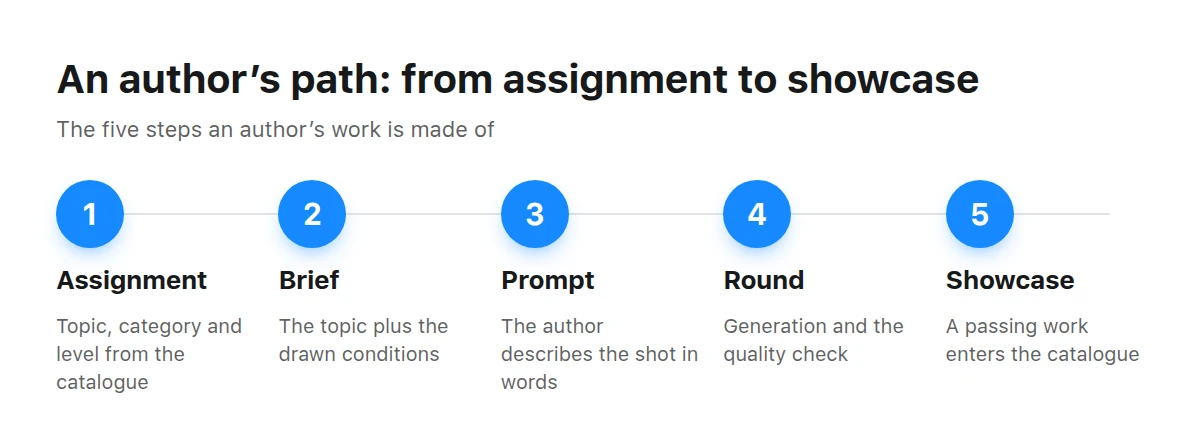
The work’s entire journey: from a catalogue row to a card on the showcase.
What does the quality check decide?
The check decides how the run ends, and it has exactly two possible outcomes.
The work passes the check. The platform buys it out at a high price—above the generation budget—and the work appears on the stock showcase. There is no second button to press: its card is created automatically, with a price, category, and title in the showcase’s five languages.
The work fails the check. The platform still buys it out, but cheaply: this is compensation for the author, not a showcase listing. Such a work remains in your gallery and does not appear in the catalogue.
Is the author’s name shown on the showcase?
No. Picwin is an unsigned stock platform: a work’s card displays its title, category, and price, but the author’s name appears neither on the card nor in filters or search. A portfolio bearing your name will not appear on the site, so you should not expect such attribution.
The showcase does not take work titles and descriptions from the author either: they are derived from the catalogue assignment and are already translated into Russian, English, Uzbek, Kazakh, and Portuguese. The author writes the prompt, not the card.
This is a deliberate showcase design, not an omission. A buyer searches for an image that fits a particular task, not for an author, so the catalogue is organised around categories and assignments. In return, this gives authors something important: every work is judged against the same quality bar, whether it is your first or your hundredth, and a well-known name has no effect whatsoever on the outcome of a run.
Key takeaways
- The assignment, brief, and level come from the catalogue—you do not need to invent a theme from scratch.
- A run costs money: either the minimum stake or an available free generation.
- The assignment level determines the check, not buyer demand.
- A work that passes the check reaches the showcase automatically, with no separate publishing step.
- A work that fails the check is also paid for, but remains only in your gallery.
- The author’s name is not shown on the showcase—this is the platform’s stock catalogue, not a portfolio.
What happens to the work next?
Then the second half of the story begins: the platform buys the image rights from the author, while copies of the work can be sold on the showcase any number of times for any length of time. This is why a showcase card can be inexpensive while the buyout can be large: one offsets the other not through price, but through the number of purchases.
Moderation in Picwin follows publication: the work reaches the showcase immediately and joins the review queue at the same time. A moderator may hide it or remove it from sale, but this no longer affects the author’s payment; the money for the run has already been paid and is not reclaimed.
The details are covered separately in what happens to a work after publishing. If you encounter an unfamiliar term along the way—prompt, seed, royalty-free, model release—you will probably find it in the AI image glossary.
BusinessBusiness scenes are among the catalogue’s most in-demand categories and among the strictest in terms of staging.
Where should you start today?
With one simple run on an easy assignment. Do not begin with the most expensive category or the hardest level: it makes sense to first understand how to read the brief and what the verdict looks like, and only then aim for complex setups.
Do I need to know how to write prompts to get started?
No. Every catalogue assignment has a ready-made prompt hint, and it is enough to launch your first run. You will start writing your own later, once you see what the check considers a match for the brief.
Can I choose which work to submit to the showcase?
No, there is no such step in the product. Every work that passes the quality check automatically reaches the showcase; everything else remains in your gallery. Selection happens not after generation, but before it—when you choose the assignment and level.
What happens if a work fails the check?
The platform still buys it out, but cheaply, as compensation. The work remains in your gallery, does not reach the showcase, and does not appear in the catalogue.
Will my name appear next to the work?
No. The showcase does not name authors: a card has a title, category, and price, but the public catalogue contains no author information at all.
Do I receive money from every sale of my work?
No. The rights are bought out once, and the fee for them is paid immediately after generation. Subsequent sales of copies are the platform’s revenue, and the author receives nothing from them.
How much can I earn in a month?
We do not and cannot have an answer: it depends on generation budgets, selected levels, and check results. Any income promises are not ours; the mini app shows only the real figures for a specific run.
Can I upload works created outside Picwin?
No. Only works generated inside the mini app for a catalogue assignment reach the showcase: each one has an assignment, category, and round from which its card is assembled.