
In short
An AI stock is a catalog of images created by a neural network rather than shot with a camera. Images do not appear by themselves: a contributor takes an assignment from the catalog, builds a prompt around it, and starts a generation, while the platform buys a successful image and places it in the storefront. A buyer finds an image with filters and purchases a license to use it.
Stock libraries have existed for decades, and their logic has always been the same: someone shoots, someone curates, and someone searches and buys. An AI stock does not eliminate any of these steps—it only changes where the image itself comes from. Here is how that mechanism works from the inside and what it means for someone who has come looking for an image.
What is an AI stock?
An AI stock is a library of images, each generated by a neural network and offered for sale under a license. Everything else works like a conventional stock library: each work has a category, title, description, price, and page, while the catalog has search, filters, and sorting.
The difference lies in the origin. On a traditional stock site, an image exists because a photographer once happened to be in the right place with a camera. On an AI stock, an image exists because someone defined a task and produced an image for it. This changes not the storefront but the way it is stocked: the catalog grows in the directions it is deliberately guided, rather than wherever photographers happened to point their cameras.
The second consequence matters more than the first: an AI stock has no “archive that needs digitizing.” The catalog is always exactly what the assignments from recent weeks have made it.
Where do the images in the storefront come from?
Contributors supply the work. At Picwin, a contributor is a participant in the Telegram mini app: they open the assignment catalog, choose a topic, read the brief, build a prompt, and launch a generation. The platform either buys the resulting image or does not—and only purchased work is sent to the catalog.
There is no scraping images from other websites and no re-uploading ready-made generations from neighboring services. Every work originates within the platform, is tied to its own assignment and category, and reaches the storefront through the same route.
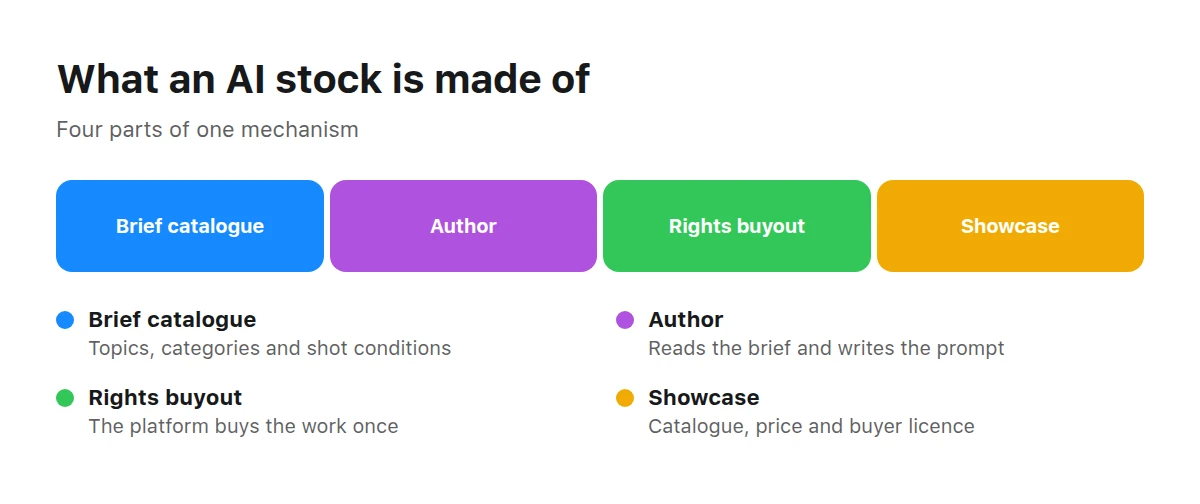
An AI stock rests on four parts, and none of them works without the others.
This leads to a less obvious point: an AI stock has almost no “accidental” images. If an image is in the catalog, an assignment somewhere in the system asked for it.
Why does a stock need briefs if AI can draw anything?
Because “anything” makes a poor catalog. The ability to generate any image does not answer the question of which image a buyer needs; without assignments, a stock turns into a dump of attractive pictures with no topics or categories.
An assignment in the Picwin catalog is not a single line. It has a category, topic, difficulty level, and prompt hint, and it opens for the contributor as a brief: a topic core plus a scenario—what the image is for, such as a website banner, magazine article, product card, or social post—and one or two restrictions on what must not appear in the image.
Briefs solve two problems at once. Contributors do not have to guess what the stock needs—the assignment says it directly. And the catalog fills predictably: from its first second, every work has a topic and category through which it can later be found.
Who reviews the work, and when?
There is a review, but it happens after publication. A work enters the storefront immediately after its rights are purchased and joins the moderation queue while already listed in the catalog; “approve” here means removing it from the queue, not releasing it to the public.
This is deliberate: the contributor’s prompt has already passed through the platform’s restrictions, and keeping everyone else’s work invisible until a shift begins would mean punishing everyone for the behavior of a few.
Moderation has two different outcomes, and they should not be confused:
- a hidden work disappears from the storefront but remains available to its contributor and to people who already bought it;
- a work withdrawn from sale is visible to nobody, and buyers receive refunds.
What exactly does the customer buy?
A license to use the image—not the image itself and not exclusive rights to it. The platform purchases the rights from the contributor once, after which a copy can be sold any number of times: purchases do not empty the catalog.
Before payment, only a watermarked preview is shown publicly—in the feed, on the card, and on the work page. The clean file lives behind a separate door and becomes available to the buyer after payment; it has no public URL.
The purchase itself takes place in the mini app: the button on the work page leads there, and the price and terms match those shown on the website.
How is this different from a traditional stock library?
In short, the difference is how the image comes into being and the consequences that follow. We cover the details in AI Stock vs. Traditional Stock Photos; the essentials are enough here.
Traditional stock
The image has already been shot—you search through what someone photographed earlier. The scene you need may simply not exist, and the only way to change anything in it is retouching.
AI stock
The image is created for an assignment: the brief defines the subject, the scene is described in words, and variations are generated in batches. In exchange, there is no real place or real event behind the image.
The honest conclusion follows: AI stock is strong when you need a generalized, “illustrative” image and weak when you need documentation—a specific city, a specific event, or a specific person.
How do you find the right image in the catalog?
Just as on any stock site, except that you search by assignment topics rather than photographers’ surnames. Four tools are available in the catalog.
| Tool | What it does | When it helps |
|---|---|---|
| Search | searches work titles in the site’s language | when the topic can be expressed in words |
| Category filter | keeps several sections at once | when the field matters more than the subject |
| Price range | removes everything above or below the limits | when the budget is fixed in advance |
| Sorting | newest, cheapest, most expensive, alphabetical | when you need a quick look across the shelf |
Catalog sections are the shortest route when your need can be stated in one word.
BusinessNegotiations, workplaces, documents, and everything used in presentations and company websites.
Close-ups of food and drinks—for menus, delivery services, and product cards.
Interiors and designed environments: what photo banks always lack in a particular style.
The storefront speaks five languages: Russian, English, Uzbek, Kazakh, and Portuguese. Work titles and descriptions are translated into all five, so the same catalog is equally readable from different countries.
Who is AI stock right for—and who is it not for?
It works when an image illustrates an idea: an article cover, presentation background, banner, interface card, or newsletter image. Such images are needed often, cost little, and almost never need to be documentary evidence.
It does not work when an image must prove something. A news story, report, event recap, or photograph of a real product or employee requires a real shoot; generation cannot replace one, regardless of price.
Being able to recognize generation from the outside is a separate issue. It is useful to both buyers and editors, and we discuss it in How to Spot an AI Image.
Key takeaways
- An AI stock works like a regular stock library but has an unusual source for its images.
- The catalog is filled by assignments, not inspiration: every work has a topic and category.
- Review follows publication: work appears immediately, and the moderation queue assesses it in the storefront.
- The buyer receives a license, not exclusive rights; before payment, only a watermarked preview is visible.
- Generation replaces illustrative images well and documentary images poorly.
Frequently asked questions
How is an AI stock different from an image generator?
An image generator gives you a result and stops there. A stock also takes care of what happens next: the work has a category, description, price, license, and page, while buyers can find it through search instead of ordering it again.
Are all images in the Picwin catalog generated?
Yes. The entire catalog consists of works created by neural networks from platform assignments; it contains no photographs shot with a camera.
Who creates the images—the platform or people?
People define the task; the neural network draws. A contributor chooses an assignment, builds a prompt, and starts the generation. No work appears without that decision.
Can I use a work in advertising?
Rights and restrictions are described in the terms, including what the platform is responsible for and what buyers must check themselves. Read them before purchasing, not afterward.
Why is there a watermark on the preview?
Because the storefront copy is shown before payment. The clean file becomes available to the buyer after purchase, and no public link to it exists.
Who created the work, and why are they not shown?
The storefront is anonymous: contributor names are not displayed on the website. The platform has acquired the rights, and the buyer deals with it rather than with an individual.
What happens if a work is withdrawn from sale?
It stops opening in the storefront, and buyers receive refunds. A hidden work is a different case: its contributor and those who already bought it can still see it.
Where should I start if I need one image right now?
Start with the catalog: choose a category, set the price range, and sort by price. That is enough to reach several suitable works in a minute.