

In short
There is no reliable single sign that says “this is AI,” but generation makes mistakes most often in certain places: hands, letters in the image, jewelry and teeth, reflections, shadows, and repeating textures. The fastest method combines three steps: inspect the details, check the whole scene, and examine the file’s source.
“Is this a photograph or a generation?” is no longer a game. The answer determines whether an image can be used in news, a report, or a product card. Let us approach the question practically: where to look, in what order, and what to do when an image appears flawless.
Can you actually distinguish a generation from a photograph?
Often yes, but not always and never from one sign alone. Models do not fail randomly: they struggle with things requiring counting and logic while imitating things that depend on an overall impression very well. Look where counting matters: fingers, letters, teeth, steps, spokes, and chain links.
The second rule is not to judge by a single sign. A hand can look distorted in a photograph, while studio photography can have perfect light. Confidence comes when several small details coincide, each of which would be explainable on its own.
Who needs this skill, and why?
Three different people, for three different reasons.
Editors need it to avoid using generation where an image will be understood as evidence: in news, reporting, or an event recap. A mistake here costs the publication trust, not merely money.
Buyers on marketplaces and classified sites need it to understand whether they are seeing a photograph of the product or a drawn version. The gap between “this is what the item looks like” and “a similar item could look like this” is the gap between a purchase and a return.
People selecting illustrations need it to make an informed choice of source. Recognizing the signs is not about avoiding generation; it is about not presenting generation as photography through carelessness.
Where should you look first?
At details that require counting and consistency. Zoom in and work through the list—it takes less than a minute.
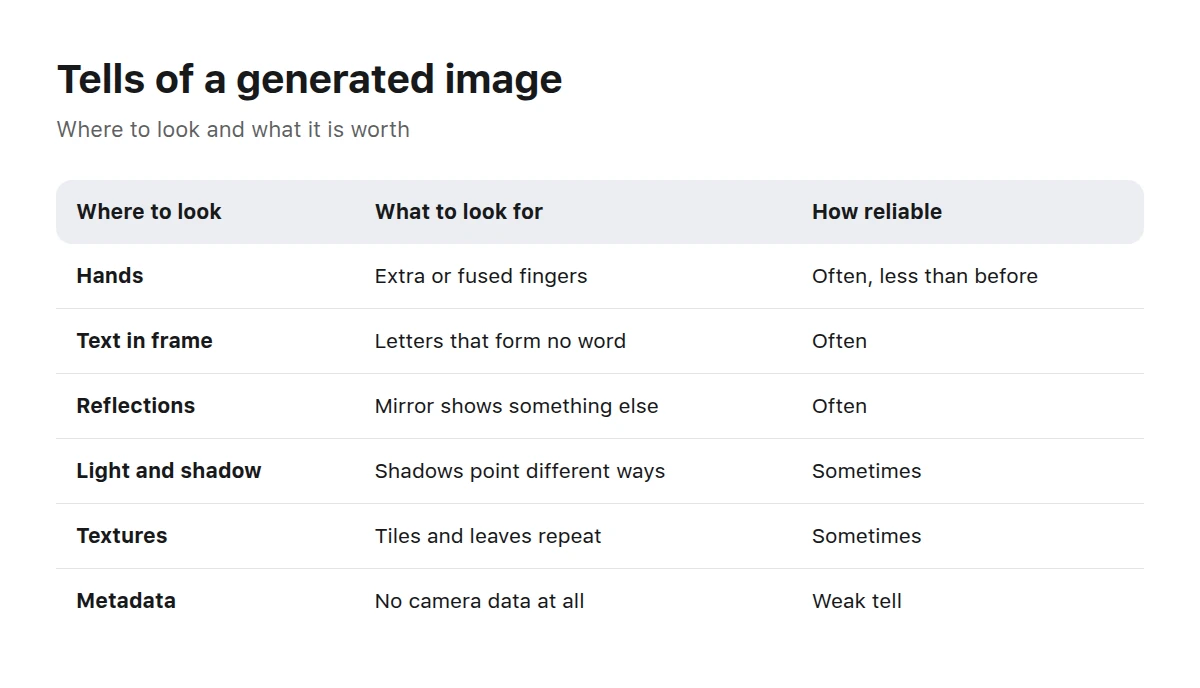
- Hands. Count the fingers; check their length, joints, and how the hand grips an object. This is the most common failure point.
- Letters and numbers. Examine signs, labels, keyboards, and numbers. Generated text is often “almost a word”: the letters look plausible, but there is no word.
- Jewelry, teeth, and glasses. Look for an earring missing from the other earlobe, a row of teeth that does not align, or a glasses arm that vanishes behind the ear.
- Small mechanisms. Straps, clasps, laces, loops, and bicycle spokes should all begin and end somewhere.
- Hair along edges. Watch for strands dissolving into the background and strands growing from a shoulder.
- Eyes. Check for pupils of different sizes, catchlights from different sources in the left and right eyes, and eyelashes merging into the eyelid.
- Background. People behind the main subject are often assembled carelessly: merged faces, ownerless hands, and objects flowing into one another.
Order matters more than completeness. Start with what is largest in the image. If the hands and text are clean and the background is assembled carefully, continuing to hunt tiny errors is pointless—move on to the scene as a whole.
The signs fall into three circles: details, scene, and file origin.
What gives away the scene as a whole?
When the details are clean, examine the scene. The mistakes here are different—not an “incorrect finger,” but a lack of consistency.
Light and shadows. Shadows from different objects point in different directions; one object casts a shadow while its neighbor does not; soft, diffuse light appears beside a hard-edged shadow.
Reflections. In a mirror, shop window, puddle, glossy table, or pupil, the reflection often shows not what is in front of it but “something similar.”
Perspective and scale. A distant person is as tall as a nearby one, a door is lower than a person’s head, or a table’s edges diverge.
Repeated textures. Tiles, brick, foliage, and crowds deserve close inspection: generation often repeats the same fragment with an offset.
A world that is too neat. There is not a speck of dust, scratch, or wrinkle, and everyone has perfectly arranged hair. Real photography nearly always contains incidental clutter.
What should you check beyond the picture?
Sometimes inspecting the file and its history is faster than studying the image.
| What to inspect | What to look for | What it means |
|---|---|---|
| File metadata | camera, lens, shutter speed | capture data is usually present in a photograph and absent from generation |
| Content Credentials | a file-level origin credential | some services sign generated files; no credential proves nothing |
| Reverse search | the same image on other websites | earlier publications can help establish its source |
| Source | who posted it and what they said | a platform whose entire catalog is generated answers the question itself |
What is most often mistaken for generation?
False positives are no less common than real discoveries, and nearly all involve photography that already looks “too much” in some way.
- Studio photography. Even lighting, a clean background, and no incidental objects are not signs of generation; they show the work of a lighting specialist.
- Heavy retouching. Smoothed skin, removed wires, and a cleaned background strip out exactly the small details used to identify generation.
- Long exposures and macro. Blurred water, headlight trails, and bokeh filling half the frame make unusual optics look “drawn.”
- Symmetrical architecture. Repeating windows and tiles resemble repeated textures even though they are simply features of a building.
- Messenger compression. Resaving artifacts produce the same blurred edges as weak generation.
The effect works both ways. A good generation with deliberate “clutter”—dust, incidental objects, and light noise—can pass a quick inspection without offering a single clue.
What does a quick inspection look like?
Three circles, from the cheapest to the most time-consuming.
Details
Zoom in and inspect hands, letters, jewelry, and small mechanisms. Most generations are filtered out here.
Scene
Check light, shadows, reflections, perspective, and repeated textures. Seek inconsistencies between parts of the image rather than one isolated error.
Origin
Review metadata, origin credentials, and reverse-search results. If the image came from a platform where everything is generated, the question answers itself.
Why do these signs stop working?
Because every failure described above is a known problem people are working to solve. Hands have improved noticeably, text within images has become readable in places, and reflections have grown consistent. That progress will only continue.
The practical conclusion is not to memorize signs but to change the question. “Was this generated?” will become increasingly difficult to answer over time. “Where did this file come from, and who is accountable for it?” does not become outdated.
When do you not need to guess the origin?
When the platform answers for itself. Every work in the Picwin catalog was created by neural networks from platform assignments. That is not a conclusion drawn from visual signs but part of the service’s design, explained in What Is an AI Stock?.
In practical terms, when choosing an illustration, you do not test whether an image is “real”; you go straight to the actual task—does it fit the layout? If the material needs a documentary image, generation is unsuitable regardless of quality, as explained in our comparison of AI and traditional stock.
AbstractAbstracts: the case where the question “is it real?” never arises.
Illustrations and graphics—the origin is immediately visible here and bothers nobody.
The article How Picwin Works shows exactly how a work enters such a catalog.
Key takeaways
- No single sign is reliable; confidence comes from several signs appearing together.
- Hands, text in the image, jewelry, and small mechanisms reveal generation fastest.
- Look for inconsistencies across the scene: light, shadows, reflections, perspective, and repeated textures.
- Metadata and origin credentials help, but their absence proves nothing.
- It is more reliable to ask “where is the file from, and who is accountable?” than “was it generated?”
Frequently asked questions
Is there a service that can identify an AI image with certainty?
Detectors exist, but their answers are probabilistic: they make mistakes in both directions. Use them as one more sign, not as a verdict.
Are hands really the most reliable sign?
Not anymore. Hands remain a common failure point, but modern models render them much better, while photographs can use angles that make fingers look strange.
What are origin credentials in a file?
They are machine-readable information about how and with what a file was created or changed. Some editors and generators add them; they are useful when present and useless once the file has been resaved.
Can camera metadata be trusted?
It is easily forged and just as easily lost during resaving. The presence of capture data is an argument, not proof.
What if the image looks perfect?
Look at its history rather than the image: where it first appeared, who created it, and what its source says. Perfection alone is a weak sign, but a reason to inspect more closely.
Should AI images be labeled in my materials?
Requirements depend on the platform and genre, but the rule is simple: if readers may interpret the image as evidence, it needs a label.
How can I tell whether an image on the stock itself is generated?
You do not need to: everything in the Picwin catalog is generated. The service’s design settles the question of origin.