In short
Every work follows the same route: a catalog assignment, a brief with a scenario and restrictions, the contributor’s prompt, generation, and a decision to purchase the rights. A purchased work enters the storefront immediately and joins the review queue there. The price is calculated from the image; the buyer receives a license and a clean file.
The easiest way to understand a stock is to follow one image from beginning to end. That is exactly what follows: what happens to the work at every step, who makes each decision, and what the buyer sees. The general structure of such catalogs is covered in What Is an AI Stock?; here we focus only on Picwin’s mechanics.
Where does a work begin?
With an assignment. The contributor opens the assignment catalog in the mini app and selects a topic, either by searching its title or through a category.
The assignment catalog is not a list of tags but a structure: each assignment has a category from the storefront’s roughly forty sections, a topic, a difficulty level, and a prompt hint. Assignment titles and descriptions are translated into every platform language, so contributors in any country read the same assignment in their own language.
These are the same categories buyers later search. An assignment from the “Food” section becomes a work in “Food”; there is no separate classification after publication.
What is a brief, and what does it contain?
A brief is an assignment expanded into a scenario. It is assembled from two parts: the topic core—what is being depicted—and conditions that the platform adds each time it is opened.
The conditions also come in two kinds: what the image is for and what it must not contain. The first might be a website banner, magazine article, social post, product card, or billboard. The second is one or two restrictions from a set tied to the image type.
Condition sets differ by work type: photographic scenes, vector marks and icons, and abstract renders. A logo is not given a “blown highlights” restriction, and a photograph is not warned against “too many anchor points.”
How does a contributor turn a brief into a prompt?
They read the scenario and write an image description. They can build on the assignment hint or ask the platform for ideas—it suggests wording that accounts for the topic, category, and required level of detail.
Generation follows: the platform sends the description to the model and returns an image to the contributor. This is a server-side process; the result is not produced on the phone and does not depend on which app the contributor has installed.
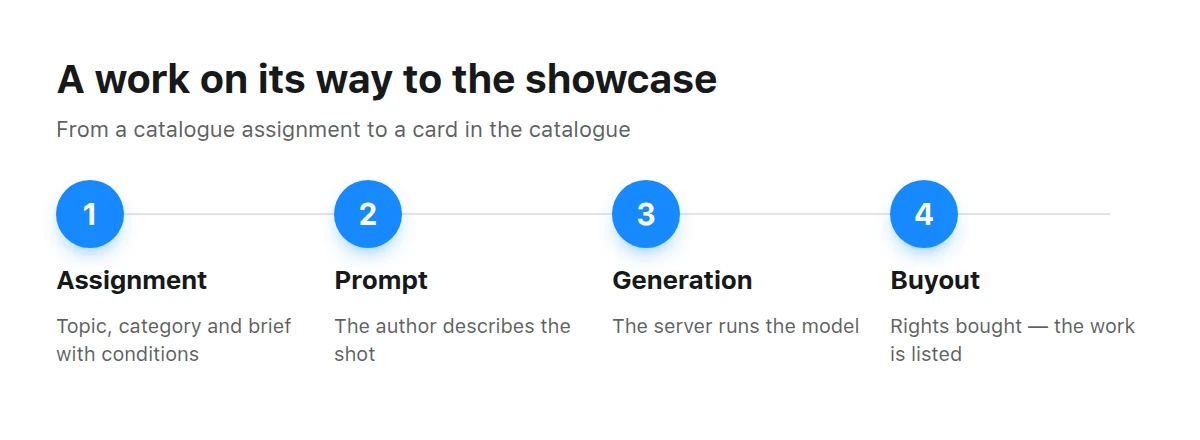
Every work in the storefront has completed this entire journey—there is no other way to get there.
What happens immediately after generation?
The platform decides whether to purchase the rights to the resulting image. This is the key moment in the entire mechanism: the purchase happens once, and afterward the image belongs to the catalog.
The main consequence for contributors is that the work is not “sold” to the buyer on the contributor’s behalf. The contributor is paid once—for the rights, not for every purchase. The image then lives in the catalog and may be bought any number of times; the number of purchases is what recoups the rights acquisition.
An image whose rights were not purchased never reaches the storefront. The catalog contains only work to which the platform has acquired rights.
When does the work reach the storefront, and who reviews it?
It appears immediately—and joins the moderation queue from there. Review follows publication: an operator does not release work to the outside world but processes what is already in the catalog.
Assignment and brief
The contributor chooses a topic from the catalog and receives a scenario: what the image is for and what it must not contain.
Prompt
The contributor describes the image in words, independently or with the platform’s hint.
Generation
The server starts the model and returns an image.
Rights purchase
The platform purchases the rights to a successful work once; a rejected image does not enter the catalog.
Storefront and queue
The work appears in the storefront and simultaneously enters the review queue—“approve” means removing it from that queue.
Review has three possible outcomes, and each looks different from the outside.
| Work status | Visible in storefront | Visible to buyer | Money |
|---|---|---|---|
| Published | yes | yes | purchase remains valid |
| Hidden | no | yes | purchase remains valid |
| Withdrawn from sale | no | no | refunded to buyers |
The distinction between “hidden” and “withdrawn” is not bureaucracy. A hidden work has left the shelf, but someone who paid for it loses nothing. A withdrawn work disappears for everyone, so the payment is refunded.
What does an assignment tell the contributor besides the topic?
Its difficulty level and a prompt hint. Difficulty does not mean “how much it pays”; it describes how hard the topic is to hit. A simple assignment takes two sentences to describe, while a difficult one requires a carefully planned scene and composition.
The hint is a description template tied to the assignment. It can be used as written or treated as a framework and rewritten. Separately, the platform can suggest phrasing ideas for a particular assignment; these reflect both its category and the required level of image-description detail.
Difficulty is also visible indirectly in the storefront because it contributes to pricing. A work from a difficult assignment lands on a higher step of the price scale than one from an easy assignment in the same category.
Why does a work immediately have a description in five languages?
Because its title and description are translations of the assignment, not copy somebody writes by hand after publication. Catalog assignments are localized into every platform language, and the work inherits them: the Russian storefront shows the Russian title and the Portuguese storefront shows the Portuguese one.
This has a useful consequence for search: use the words in which the assignment is phrased, not a description of everything you see in the image. Storefront search compares a query specifically against work titles in the page language.
How is a work’s price calculated?
The price belongs to the image, not to the contributor’s luck. It combines a step determined by the category, an adjustment for the assignment’s difficulty level, and a small variation attached to the particular work.
An important consequence is that what the contributor received does not affect the price. Rights were purchased once, and that purchase is recovered through the number of sales, not one work’s price tag. This is why the catalog has no works costing “thousands”: its scale is aligned with familiar microstock pricing.
What does the buyer see?
Before purchase, a storefront copy: a watermarked preview in the feed, on the card, and on the work page. The clean file sits behind a separate door and opens after payment; it has no public URL.
Besides the image, the work page contains a category linking to its section, publication date, localized description, usage-terms block, and similar works from the same section. There is no contributor name: the storefront is anonymous.
If a work has already been withdrawn, its page does not open. The website clearly says the work is gone and suggests returning to the catalog. Such a link does not “fail silently”; it receives a distinct response instead of an empty screen.
The purchase happens in the mini app, which is where the website’s button leads. Contributors cannot buy their own work, and a second purchase of the same work is rejected because the buyer already has a license.
Where should you look for the contributor side?
Contributor mechanics live in the mini app: the assignment catalog, generations, and everything related to rights acquisition are there. The storefront serves buyers and intentionally shows neither contributors nor their results.
PeoplePeople and portraits—the most popular section among both buyers and contributors.
Nature and landscapes: assignments with broad scenarios and large numbers of works.
If you first want to understand how this catalog differs from a familiar photo bank, see our separate comparison. If you are viewing the catalog as an editor and want to check where images come from, our guide to the signs of an AI image will help.
Key takeaways
- Every work follows one route: assignment → brief → prompt → generation → rights purchase → storefront.
- A brief adds a scenario to the topic: what the image is for and what it must not contain.
- Rights are purchased once, so a work can be sold repeatedly and does not disappear after a purchase.
- Moderation follows publication: the work appears immediately and is reviewed in the storefront.
- Price comes from the image—its category, difficulty, and individual variation—not the contributor’s payment.
Frequently asked questions
Who chooses what will be in the catalog?
Assignments do. The catalog fills with topics that have been set as assignments, so it predictably contains core categories and no accidental archives.
Can a contributor upload a finished image from elsewhere?
No. A work can only appear as a generation from a platform assignment; there is no way to upload outside files to the storefront.
What happens to an unsuccessful generation?
It stays with the contributor and does not enter the catalog. Only works whose rights have been purchased reach the storefront.
Why do similar works have different prices?
Price combines the category, assignment difficulty, and a variation attached to the work. Two images from one section can occupy neighboring steps on the scale.
Can I purchase a work directly on the website?
Payment happens in the mini app. The work-page button leads there, while the price and terms match the website.
What happens if a work is withdrawn after purchase?
The money is refunded. This distinguishes withdrawal from hiding: a hidden work remains available to the person who bought it.
Why does the storefront not show the contributor?
The platform has purchased the rights, and the buyer deals with the catalog. The storefront is anonymous in all five languages.