

In short
The main image must show the real product. Major marketplaces are clear about that. Generated visuals can still work for backgrounds, lifestyle scenes, shop banners, and infographic backdrops, where the image is supporting the product rather than replacing it. The difference between a useful asset and a rejected listing is where that image appears.
Sellers rarely look for extra imagery on a whim. A shoot costs money and takes time, while twenty listings may each need a background, a scene, and a banner. The temptation to “generate everything” lasts until the first listing is blocked. Here is where the line sits, what the platforms say in their own rules, and which catalogue images are safe to use.
What images does a product listing actually need?
A listing needs at least four different kinds of image, and only one is the photograph of the product itself.
Main photo. The product exactly as it is: the same colour, package contents, and size. This is the one slot where invention is never acceptable.
Additional angles and details. These also need photography: seams, texture, ports, and labels.
Lifestyle image — the product in context. A kitchen, bedroom, office, or street. The setting matters more than the object here, and the setting is often the hardest part to shoot.
Backdrops, backgrounds, and banners. An infographic background, brand-store cover, promotion banner, or image for social and email. The product may not appear at all.
The first two are a photographer’s job. The other two are an artist’s job, and generation can save both budget and weeks of production.
What do marketplaces say in their image rules?
Each platform publishes file requirements and separate rules for what may appear in the frame. The details below come from their own documents as of publication. Rules change, so open the original before uploading.
Amazon. The image guide requires the main image to be a real photograph of the product on a pure white background. The product must fill at least 85% of the frame, the longest side must be at least 1000 pixels to enable zoom, and the main image must contain no text, logos, borders, or watermarks. From 2026, sellers must also add the appropriate metadata before uploading images that contain photorealistic AI-generated people — Product image requirements.
Etsy. Etsy explicitly requires your own photographs of the finished item, not renders or stock images. For personalised products, the first image must show a finished customised example: a “Your Text Here” mockup cannot be the main image, though computer-generated mockups may appear in additional images. If a production partner prints your design on a base item, a stock mockup is allowed to show the result — Listing Image Requirements.
Ozon. Its documentation lists JPEG, JPG, PNG, HEIC, and WEBP, a vertical 3:4 ratio for all categories, resolution from 200 × 200 to 4320 × 7680 pixels (starting at 900 × 1200 for clothing, footwear, and accessories), and a maximum file size of 10 MB. If a main image has another ratio, the platform may crop it for you — and decide what falls outside the frame: Image requirements.
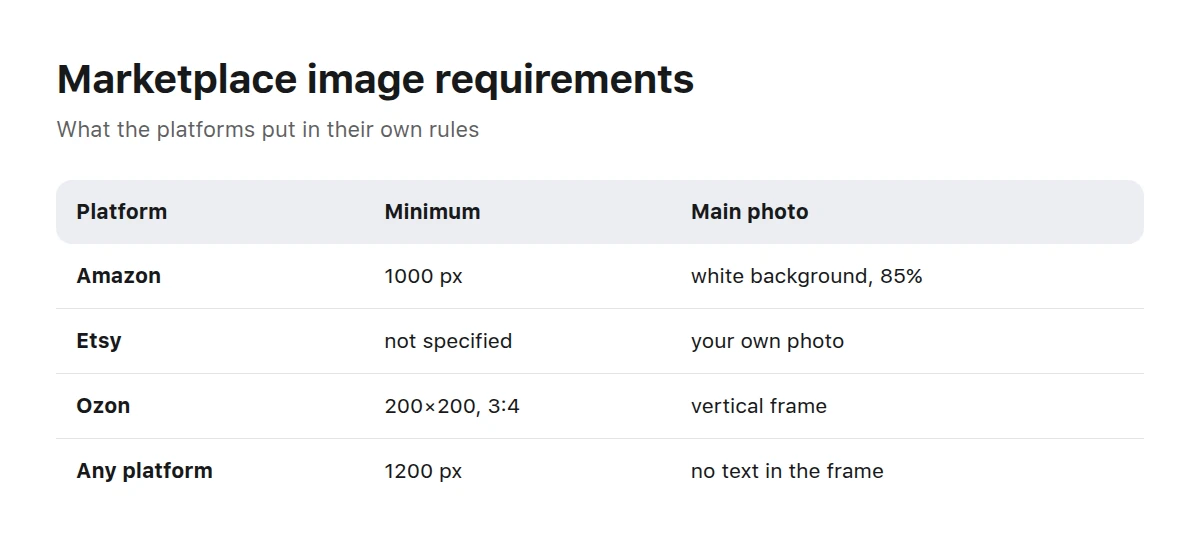
The numbers come from the platforms’ own rules and change over time — check the original before uploading.
All three share one principle: a product image must depict the product. The surrounding scene, background, and design serve a different purpose.
How should you check an image before uploading it?
It is easier to work through one checklist than to deal with moderation later. This list is based on requirements the platforms publish themselves.
Pre-upload checklist
- Prepare a vertical 3:4 version for Ozon and mobile marketplace feeds.
- Keep the longest side at 1200 pixels or more to cover Amazon zoom and leave room for resizing.
- Use a platform-supported format and keep the file comfortably below its size limit.
- Keep text, logos, watermarks, borders, and collages off the main image.
- Show the real, exact product: colour, set, and quantity must match.
- Match the background to the category; where pure white is required, light grey is not enough.
- If an image contains a photorealistic AI-generated person, check the disclosure rules and add the required metadata.
- Leave generous room for labels and badges because each storefront crops images differently.
What can be generated, and what must be photographed?
The split is simple: generation handles the setting and presentation; photography handles the product.
Generation works
- Backgrounds and infographic backdrops
- An interior or outdoor setting where a photographed product is added as a separate layer
- Promotion banners, brand-store covers, and shop headers
- Images for email, social media, and ad creative
- Seasonal mood: an autumn table, summer beach, or festive lights
Photography is required
- The listing’s main image
- Angles, details, texture, and package contents
- Your product held or worn by a person
- Anything a buyer will compare with the delivered item
Mockups are a separate case for products that do not physically exist yet, such as a print on a T-shirt, a notebook cover, or a label. Platform rules differ: Etsy allows mockups in additional images but requires a finished customised item first; Amazon insists on a product photograph in the main slot. Check the specific platform rather than relying on general industry practice.
What jobs can a ready-made catalogue image handle?
Here are five common reasons sellers need images and the sections where those assets live.
An infographic background
A clean scene without fussy detail, ready for text, icons, and arrows. A quiet texture or soft gradient works better than a “beautiful” photograph.
A scene for a product composite
An interior, counter, shelf, or display shot so the product can be composited with a shadow and believable perspective.
A shop banner or brand-store cover
A wide frame with room for a heading. Generation works especially well here: one idea can produce a full family of covers in the same style.
Lifestyle content for social and email
“How it is used” images without a crew, location, or models.
A seasonal storefront
Sales, back-to-school, and holidays: the season arrives faster than a photographer can return.
Mockups and templates: backdrops, devices, packaging, and covers ready for your design.
Lifestyle: everyday scenes, hands, and people using products in context.
Textures and patterns: clean backdrops for infographics and banners.
If the sections do not have the scene you need, browse the full catalogue; search covers both titles and descriptions.
What can you do when nobody has the image you need?
Generate it for your own brief. If the catalogue lacks the right background or scene, you can build it in the Picwin mini app using the same tasks and briefs that produce work for the storefront.
Next, learn how to build a consistent product visual set, show money and work without stock clichés, and create travel visuals without the trip. The methods overlap even when the subjects differ.
Can AI-generated images be used on marketplaces at all?
Yes, but not as a substitute for product photography. Backgrounds, scenes, banners, and supporting design can use generated imagery as long as the frame does not mislead buyers about what they will receive.
Do generated images need to be labelled?
It depends on the platform and the content. From 2026, Amazon requires metadata for images with photorealistic AI-generated people. There is no single rule requiring every generated image to be labelled, so check the relevant platform.
What resolution should I prepare to cover all three platforms?
A 3:4 vertical image with a longest side of at least 1200 pixels covers Ozon’s format and leaves enough resolution for Amazon zoom. Etsy does not specify a minimum in the source cited above, so check its current guidance before upload.
Why was a listing rejected even though the image looked good?
Usually because of content rather than image quality: text or a logo on the main photo, a border, or a product that is not shown accurately. Platforms treat content rules separately from file specifications.
What should I do with a product that does not exist yet?
Use a mockup according to the platform’s rules. Etsy permits one in additional images but requires the finished customised item in the first image. On platforms with strict main-image rules, make and photograph a sample first.
Can I composite a product into a generated interior?
Yes. This is a common, practical technique: photograph the product and generate the setting. Keep it out of the main-image slot, and make sure perspective, light, and shadows agree.
How can I quickly tell whether an image will be rejected?
Use the checklist above, then view the image in the platform’s mobile feed. Text, borders, awkward crops, and other obvious problems are much easier to spot in context.