In short
A prompt describes the image an AI model should assemble. It helps to divide it into subject, hero, setting, light and framing, because each part controls a separate group of decisions. If a part is missing, the model chooses it. A good request therefore need not be long; above all, it clearly fixes what matters.
Why does the model read a request literally?
The model does not know your practical goal or what you consider a successful result. It connects words to visual features, builds the image under the stated conditions and fills gaps with likely options. A sentence may seem clear to a person who knows the conversation’s context. A generator often lacks that shared context.
Suppose you need an illustration for a wide website banner. If you name only the object, the model will choose the orientation, scale, background and placement. The image may work on its own, yet leave no room for a headline. This is not disobedience: the image’s purpose was never expressed through visible features.
Literal reading does not mean every word is guaranteed to appear. Conditions interact: a wide establishing shot conflicts with a request for tiny textures, while evening gloom conflicts with bright, even lighting. The clearer the priorities and the fewer the conflicts, the fewer decisions the model makes for you.
What parts make up a request?
A practical request can be assembled from five parts: subject, hero, setting, light and framing. This is not rigid syntax but a checklist that reveals where you have left an important choice to the generator.
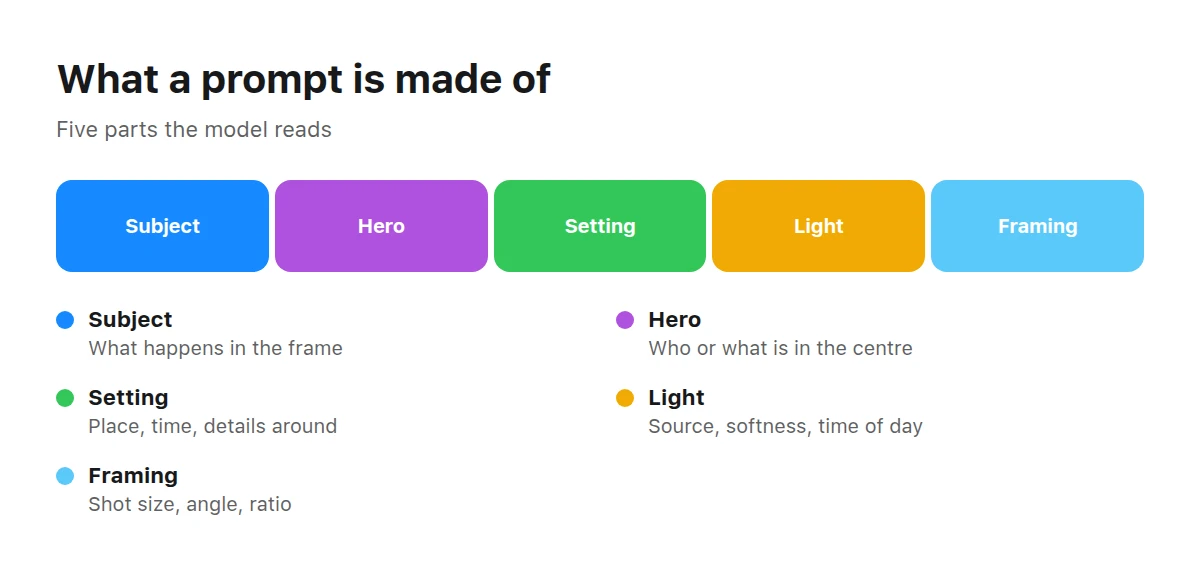
The more precise each part, the less chance is left in the result.
Subject answers “what is happening”. It is an action, state or relationship: a person cooks, a device lies on a desk, leaves move in the wind. Without a subject, the model may create a static product display even when you need a scene with clear action.
Hero is the main object or character carrying the meaning. Name its distinctive visible traits, pose, material or state, but do not write an exhaustive profile. Without a named hero, the visual centre may shift to the background, props or a random detail.
Setting defines the place, time and meaningful surrounding objects. A domestic kitchen and a laboratory kitchen provide different contexts even if the action is identical. Omit this part and the model will choose a typical environment that may not support your story.
Light sets direction, softness, contrast, time of day and the overall feeling. It separates the hero from the background and reveals form. If unspecified, the result is usually acceptable but generic. The link between light, shot, angle and the notional “camera” is covered in the guide to light and composition.
Framing describes where we see the scene from and at what scale: wide or close shot, eye level, overhead view, centred or offset composition, landscape or portrait orientation. Without it, the model chooses the viewpoint freely. For an applied image, specify room for text or a product interface, turning its purpose into a compositional condition.
Style can be layered over this foundation: documentary treatment, matte colours, graphic geometry or a soft editorial look, for example. No artist’s name is needed. A separate guide to styles and references explains how to break style into observable traits.
How do you assemble a request part by part?
Start with the image’s meaning, then move from the main idea to refinements. This order keeps the task from getting lost among decorative characteristics.
Name the subject and hero
In one sentence, state who or what is central and what is happening. Choose only traits that must be visible and matter to the meaning.
Add the setting
Specify the place, time or several surrounding objects without which the scene would be misread. Do not fill the background with random props: each named object adds another condition.
Describe the light
Choose its source, direction and character. A coherent set such as soft side daylight is usually enough; several lighting schemes in one request create conflict.
Choose the framing
Name the shot size, angle, orientation and hero placement. If the image belongs in a layout, reserve an open area for text or another element immediately.
State the purpose
Turn the format into visible requirements: a cover needs a clear centre, a product card a legible object, and a banner a suitable balance of space and hero. The word “banner” works better with a description of the composition.
Reread and remove contradictions
Check whether every condition can be met at once. Keep what matters, remove repetitions and decide which requirement takes priority when two instructions pull the image in different directions.
After assembling it, read the request as a list of decisions, not polished prose. Every fragment should have a simple answer to “what exactly does this change in the image?” If there is no answer, shorten it.
What does refinement change, before and after?
Refinement fixes the subject, context, light and composition that remained random in a short request. The comparison shows not “correct words”, but the move from a broad theme to a visible setup.
Before
A cosy kitchen with breakfast.
- cosy — conveys a mood but not its visual features;
- kitchen — names a place without details;
- breakfast — sets a theme, but not the hero, action or framing.
After
A person pours tea into a ceramic cup in a domestic kitchen in the early morning, soft side light from a window, warm muted colours, a medium shot at table height, and free space on the left for text.
- a person pours tea — establishes the hero and action;
- a ceramic cup in a domestic kitchen — refines the object and setting;
- in the early morning, soft side light from a window — connects time and lighting;
- warm muted colours — expresses the mood through the palette;
- a medium shot at table height — defines scale and viewpoint;
- free space on the left — prepares the composition for text.
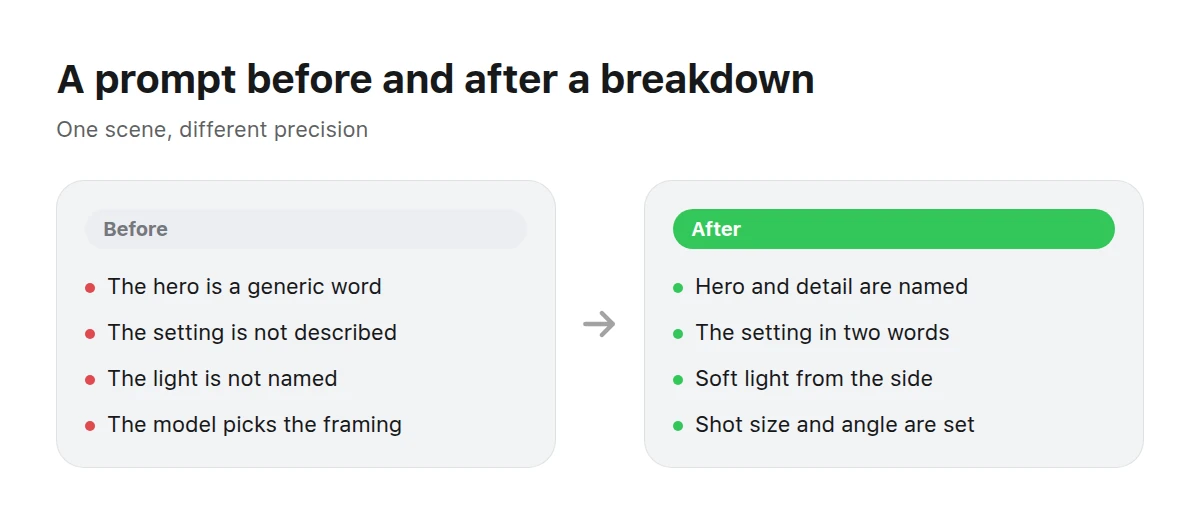
Refining does not add length for its own sake — it removes the gaps the model would fill for you.
In the revised version, the action becomes the visual centre, the kitchen gains a domestic context and morning is tied to a specific light source. The palette turns “cosy” into observable traits. Shot size and viewpoint constrain the scene, while the open area serves its later use. The request still does not list every plate and surface: unimportant details remain variable.
FoodFood images make it easy to see how action, tableware, surface and light transform the same subject.
What should you do with things that must not appear?
First describe the desired scene so the unwanted element has no natural place in it. A positive condition usually tells the model what to substitute more precisely: a clean work surface explains the result better than a long list of things that cannot be on the table.
An exclusion is still necessary when absence is essential. State it briefly and unambiguously beside the relevant part. If people must not appear, do not add an action requiring visible hands. If the background must contain no text, do not request an interior with signs and packages covered in writing.
In Picwin, what must not appear is included in the brief with the theme and purpose. When choosing a prompt option, check not only whether the idea is appealing, but also whether the scene fits the restriction. If the setting logically implies the unwanted element, choose an option built differently. Typical conflicts and visual failures are covered in common generation mistakes.
How much detail is enough?
There is enough detail when decisions affecting the task are fixed and the rest can safely be left to the model. Length alone says nothing about quality. A short, coherent request can be more controllable than a long list mixing a subject, several moods and incompatible angles as equals.
Test each refinement with two questions: will it be visible, and does it matter to the image’s use? The cup’s material may matter in a tableware catalogue but be incidental in an article about habits. The colour of a tiny distant object rarely deserves attention unless it supports the composition.
A useful sign of overload is being unable to explain another adjective’s role. Remove decorative synonyms that repeat one idea. Then check whether purpose and composition conflict: asking the hero to fill the entire frame is incompatible with an open field for a headline.
InteriorInteriors show especially clearly how setting, viewpoint and light direction organise space.
How does this work in Picwin?
In Picwin, the creator does not type a prompt manually. In the Telegram mini app, they choose a task level and tap “Find a task”. The brief comes from the catalogue and combines a category theme, an image purpose—such as a banner, product card, magazine article or brand post—and randomly assigned conditions for what must not appear.
The model offers several text options for this brief. The creator browses and chooses one. Options differ in their setup: shot and angle, lighting, palette and mood, and photographic treatment. They are not rearrangements of the same words, but different ways to solve one task.
Knowing prompt anatomy helps you understand that choice. You can see where an option offers a more suitable subject, leaves room for text, or uses light or an angle that conflicts with the purpose. The same skill applies in any generator where requests are written manually.
The creator also sets a generation budget called “power”. It determines the model and how detailed the suggestion is. The finished work is then reviewed. The platform buys an accepted work together with its rights, and it appears as a stock catalogue card where it is licensed. Demo mode lets you try the process without money, but demo work is not published and earns no points.
Key takeaways
- A good prompt fixes important decisions—subject, hero, setting, light and framing—not every possible detail.
- Unnamed parts do not disappear: the model chooses their parameters.
- Turn the image’s purpose into visible conditions for composition, scale and open space.
- Exclusions work more clearly when the desired scene is already positive and contradiction-free.
- Read a request as a list of functions: every fragment should have a clear role.
What is a prompt in simple terms?
A prompt is the request an AI model uses to create an image. It describes the desired scene and narrows the choice of subject, objects, surroundings, light and composition.
How long should an image prompt be?
There is no fixed correct length. Include conditions important to the task, but do not duplicate them or combine contradictory requirements.
Does word order matter in a prompt?
Order helps show priority: put the main subject and hero before refinements. Yet coherent conditions matter more than finding one perfect sequence.
How should you write negative conditions in a prompt?
First describe what should be in the frame, then briefly name essential exceptions. Check that the subject or setting does not imply something you are simultaneously excluding.
What language is best for an AI prompt?
Use a language supported by the chosen tool in which you can express visible traits precisely. After generation, judge not the wording’s language but how well the result meets the semantic and compositional conditions.
Do you need magic words for a good prompt?
There are no universal magic words. It is more reliable to understand each part’s function and describe observable traits instead of accumulating striking but vague adjectives.
Why does the same prompt produce different images?
Generation preserves variation rather than reproducing one predetermined frame. The more parts you leave undefined, the more the subject detail, surroundings, light or composition may vary.